GEO Scout ships MCP integration: an AI strategist for your team via Claude, ChatGPT, Cursor and Claude Code
Model Context Protocol gives AI agents direct access to brand monitoring data. The agent reads full AI responses, breaks down sources, drafts article briefs and reports — in one conversation instead of days of manual analysis.

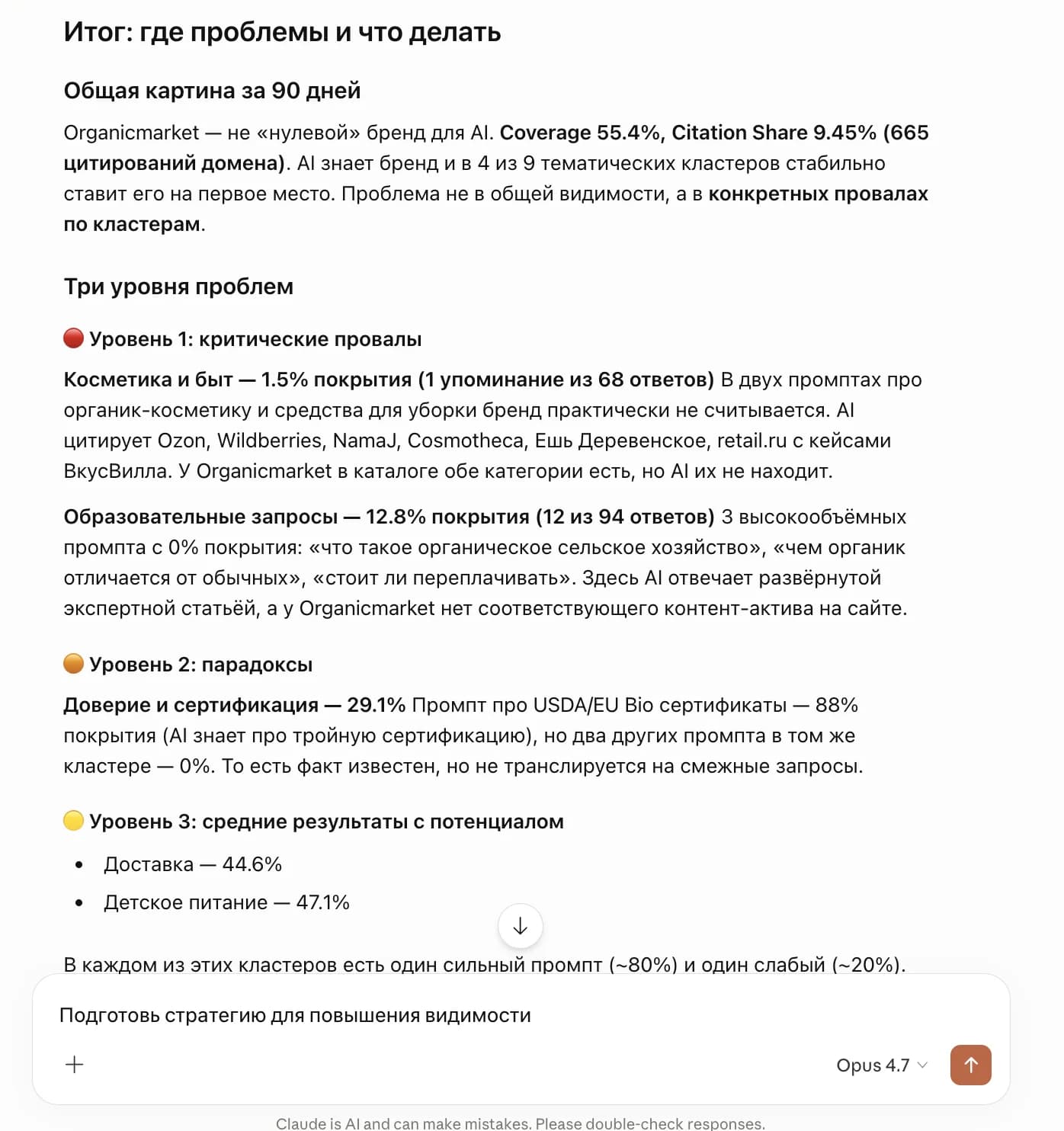
What we shipped
I sat on this announcement for a while because the obvious framing — "now you can quickly ask Claude one-off questions about your brand" — sells it short.
It's actually the opposite. An AI strategist via MCP does the heavy analytical work — the kind a dashboard can't show and a marketer does by hand for days. Reads full AI responses, not aggregated cuts. Works through every cited source, looks for patterns across prompts, forms hypotheses. Builds strategy and briefs around specific gaps.
This isn't "convenient dashboard search." It's what a senior marketer or external GEO consultant typically does over half a working week.
The point: the MCP agent works with the same data the dashboard shows, but at a different level. Dashboard — for quick cuts and charts. Command Center — for a prioritized execution backlog. AI strategist via MCP — for deep analytics, root-cause hunting, and strategic artifacts.
What changes for the team
A typical scenario: a marketer notices the brand is losing several commercial prompts in ChatGPT to competitors. The usual workflow: open monitoring, filter by prompt, list cited domains, compare with competitors, find the gap, draft an article brief, sync with the editorial team. Half a day to a full day, plus waiting on the analyst and the editor.
With the MCP integration, this is one conversation in chat with Claude or ChatGPT. The agent calls the right methods on its own, reads full AI responses, breaks down sources, compares with competitors, and returns an analytical breakdown with concrete conclusions.
Then ask right away: "Based on this gap, draft an article brief — title, URL, target key entities, JSON-LD blocks, reference formats from vc.ru." The agent will pull the gap-prompt, cited sources, topical entities from 50+ AI responses, and your brand profile — output is a brief ready to hand to a writer.
After the article ships — ask the agent to track the impact 30 days later and assemble a Citation Share and SoV report for the topic.
What in a normal workflow looks like "ping PR, wait for the analyst, sync with the editor, get a brief next week" happens here in one conversation.
A real example: gap analysis for an organic-goods brand
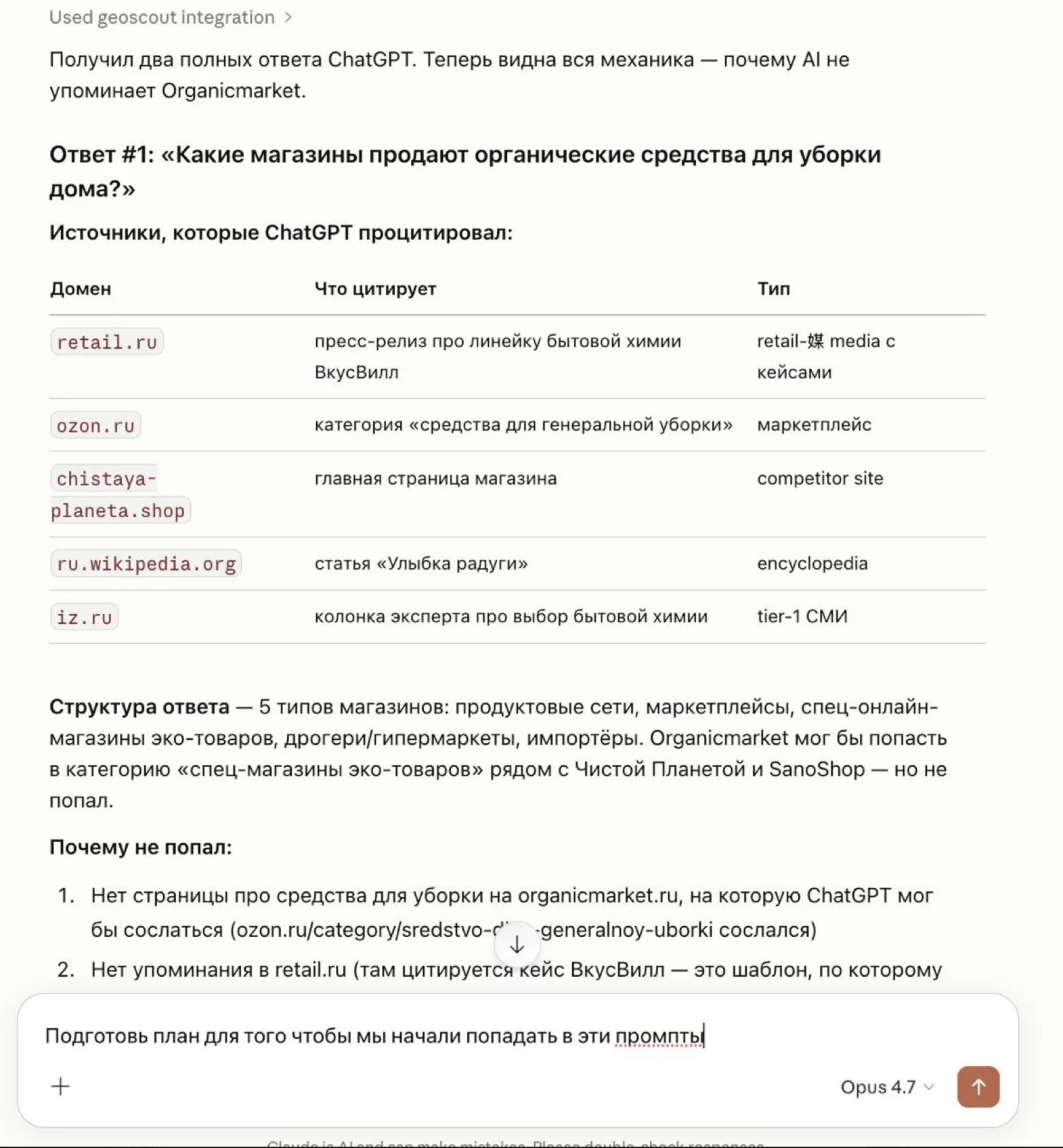
The screenshot above shows a real Claude conversation with the GEO Scout MCP integration for a brand in the organic cleaning niche. The user's request was simple — "why doesn't ChatGPT mention our brand on the cleaning-products query?"
Here's what the agent did:
- Read the full ChatGPT responses for that prompt
- Pulled the cited domains and classified them (retail media with case studies, marketplace, competitor site, encyclopedia, tier-1 publication)
- Compared the source types with competitors that did make the answer (VkusVill, Ozon, Chistaya Planeta and two others)
- Articulated reasons the brand didn't make it: no cleaning-products page on the site, no retail.ru article mentioning the brand, no citation-friendly content with factual hooks
- As the next step — assembled a full quarterly content plan with four prioritized articles and a detailed brief for one of them (gap-prompt "where to buy organic cosmetics in Moscow", 28 AI responses, target COSMOS / ECOCERT / NaTrue certifications, niche brands, JSON-LD Article + FAQPage, 30-day check-in via
get_publication_impact)
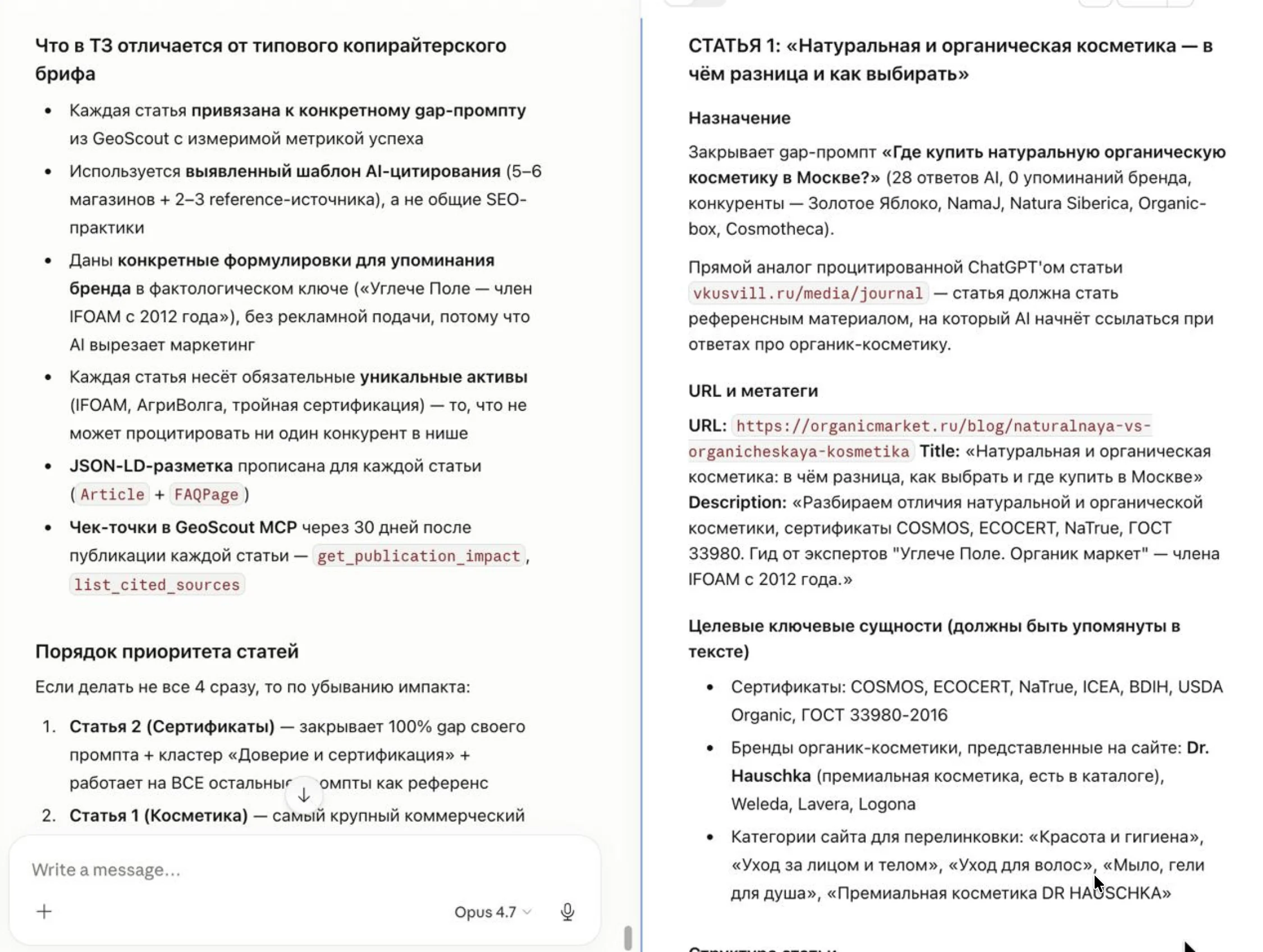
This isn't "asked ChatGPT to write an article." This is strategist work grounded in real brand-monitoring data — who AI cites, which sources it relies on, which entities it surfaces.
Three layers of one system
After shipping MCP, GEO Scout has three coordinated layers of work over the same monitoring picture:
- Dashboard — quick cuts and charts. Metric dynamics, provider breakdown, source map, competitor profiles. Open it, see the cut, close it.
- Command Center — prioritized execution backlog. What to fix on the site first, which articles to write, which outlets to pitch for mentions. A ready plan without manual prioritization.
- AI strategist via MCP — deep analytical work on the same data. Root-cause analysis, hypothesis formation, strategic artifacts, iterative breakdowns. The layer a senior marketer or external consultant used to handle.
MCP doesn't replace the first two — it operates on top of them, at a depth the UI can't reach.
Setup takes a minute
The MCP integration guide has step-by-step instructions for each client:
- Claude Desktop — JSON block in
claude_desktop_config.jsonwithnpx -y mcp-remote. Requires Node.js 18+ - ChatGPT (Plus/Pro/Team/Enterprise) — Settings → Connectors → Add custom connector
- Cursor — Settings → MCP servers → + Add server, UI form
- Claude Code CLI — one-line
claude mcp add --transport http geoscout https://geoscout.pro/api/mcp
Authentication via OAuth with the GEO Scout consent screen or via a Personal Access Token you can generate in settings. Read-only access, brand selection at authorization, one-click token revocation.
The guide also has detailed examples of real workflows: root-cause gap analysis, article brief drafting, monthly report assembly, source-citation audits, 30-day publication-impact tracking.
What's next
Version one ships with 24 read-only tools that cover every dashboard cut. On the roadmap: expanding the toolset based on user feedback, supporting write operations under a separate mcp:write:* scope (creating Command Center tasks through a chat with the agent), and templated prompts for typical tasks the agent can invoke as a whole.
If you already have Claude or ChatGPT in your workflow, plug it in and try it on your brand. Feedback on which scenarios proved most valuable and which tools are missing would help a lot — reach out at @geoscout_support or support@geoscout.pro.