Company facts for AI monitoring: how to prepare a reliable reference
Build a company fact set for AI answer checks: what to include, examples for manufacturers and SaaS, update rules, and how reference facts differ from model training.

An “About us” document often mixes company history, promotional claims, old terms and many product specifications. For ongoing AI checks, a set of individual statements is easier to maintain and compare.
Use this workflow to prepare references for an AI brand accuracy audit. All business examples below are illustrative rather than claims about real companies.
Knowledge bases, fact sets and model training
A knowledge base stores materials: manuals, pages, policies and service descriptions. A fact set extracts specific statements selected for checking. Model training is a separate process; uploading documents to a monitoring platform does not update external models’ knowledge.
For example, a 30-page manual covers five equipment models. You select three facts about warranty, compatibility and operating temperature for one model. The rest of the manual remains a reference for context; it does not become a checklist that every AI answer must repeat.
In GEO Scout, facts are references for comparison with collected answers. Saving an internal reference and publishing information on the web are distinct actions.
Choose facts by their impact on customers
Prioritize claims that could cause an unsuitable purchase or an incorrect rejection of your service. These usually matter more than a company-history detail.
Consider six areas:
- Products and services: what the company makes, sells or provides. Distinguish manufacturers, retailers and integrators.
- Capabilities: functions available in a particular product or plan.
- Geography: where delivery, installation and support are available; these areas may differ.
- Terms: warranty periods, minimum orders, connection requirements and trial availability.
- Compatibility and limitations: supported formats, equipment, platforms and exceptions.
- Company identity: official names, product ownership and distinctions from similarly named organizations.
Do not start by maximizing volume. A small, current set with a responsible owner is more useful than an extensive collection with no sources or maintenance process.
A template for a checkable fact
Use subject → property → value → necessary conditions.
“Example provides equipment installation” is a basic fact. If installation is available only in London, include the location. If it requires purchasing the equipment, include that condition too.
In your team’s working register, it is useful to keep:
- the statement;
- its supporting document or URL;
- applicable model, plan, market and effective date;
- an owner and the date it was last reviewed.
This is a suggested working template, not a list of mandatory GEO Scout interface fields. Put conditions into the fact text when omitting them would make a comparison misleading.
Examples for different businesses
Manufacturer
Weak wording: “We make high-quality equipment with the best warranty.”
Checkable statements:
- “Example manufactures X-series pumps.”
- “The manufacturer warranty for pump X1 sold in the UK is 24 months.”
- “Pump X1 is designed for clean water.”
An answer may identify the product range correctly but misstate the intended use. Separate facts expose that specific discrepancy.
SaaS product
Weak wording: “Everything your team needs in one tool.”
Checkable statements:
- “The Team plan of Example supports task export to CSV.”
- “Example allows one responsible assignee per task.”
- “The Team plan has a 14-day trial.”
The plan name matters: a capability in a higher tier should not automatically be attributed to the free plan.
Services and delivery
Weak wording: “We operate nationwide.”
Checkable statements:
- “Example delivers equipment throughout the UK using transport companies.”
- “Example provides on-site installation in London.”
- “Example offers remote consultations in English.”
Separating delivery from installation prevents a nationwide shipping claim from being interpreted as nationwide on-site service.
Wording that makes checks unreliable
Avoid “best”, “leading” and “most convenient” without an explicit criterion and comparison source. These are positioning claims rather than standalone product properties.
Do not merge terms for different countries, product versions or customer types. Their applicability should be clear from the statement.
Use “only”, “always” and “everywhere” only when those stronger claims are accurate. “The company sells pumps” does not mean “the company only sells pumps”.
Do not retain contradictory active facts without dates or qualifying conditions. The checker should not have to guess which document takes precedence.
Add the facts to GEO Scout
Open Accuracy → Brand facts → Add facts. You can enter facts manually, import a CSV, or prepare them from text and knowledge-base materials. Manual entry uses one fact per line.
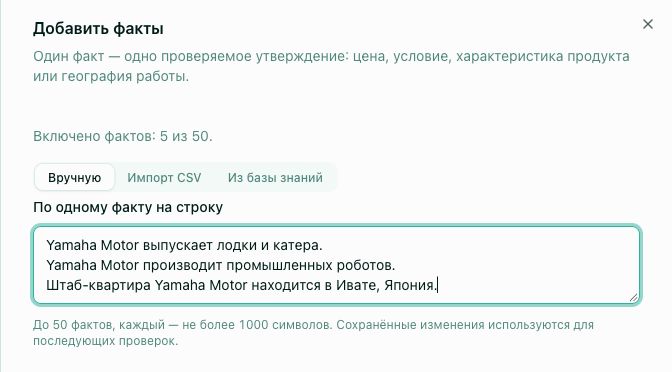
For CSV imports, use the first column for facts and include a header row. Review the imported text. For knowledge-base material, select documents or paste text, prepare statements and edit them before saving. Automatically prepared wording is not independent verification of the source material.
The limit is 50 enabled facts per brand, and 1000 characters per entry. Disabling temporarily excludes a fact from checking and frees a slot. Combining many unrelated claims into one entry to bypass the limit makes results harder to interpret.
After saving, select monitoring prompts. Paid subscriptions include 20 prompts for accuracy checks. Discuss a larger selection with support in chat or at support@geoscout.pro. Preparing facts and starting a check are separate steps; the accuracy guide explains both.
Keep the reference current
Assign owners by subject: product teams for functions, service teams for warranties and operations teams for coverage. Review relevant facts when terms change, rather than waiting for a complaint.
State when new conditions take effect. An older answer may have been correct when generated. Do not treat every historical answer as wrong simply because the current terms differ.
Before using restricted documents, decide whether the information belongs in the checking workflow and whether it should be published at all. Public communication should use information intended for customers.
Connect the reference to SEO and GEO
An internal register supports verification. Public pages help customers and search systems find current information. Map important facts to product, warranty, delivery and documentation pages; resolve conflicting descriptions rather than publishing many near-identical SEO articles.
Google’s guidance for generative search continues to emphasize foundational SEO practices and useful, reliable content. That supports maintaining clear, accessible pages, but it does not promise that a brand will appear in a particular AI answer. Source: Google’s guide to optimizing for generative AI search.
After updates, check new answers to comparable questions. Repeated discrepancies may come from an external page, a mistaken comparison or ambiguity in the reference itself. Your next step is to review individual AI claims and connect each confirmed contradiction with a correction.
Частые вопросы
Which company facts should I use to check AI answers?
Does uploading facts to GEO Scout train ChatGPT?
Can I prepare facts from a knowledge base?
What makes a fact checkable?
How many facts can I save in GEO Scout?
Related
How to check the accuracy of AI answers about your brand
Find factual errors in AI descriptions of your company: prepare reference facts, review claims, distinguish contradictions from omissions, and inspect source links.
How to Fix AI Errors and Hallucinations About Your Brand
A practical guide to correcting AI hallucinations: wrong prices, outdated information, incorrect brand descriptions. Diagnosis, correction strategy, and monitoring results.
Technical Checklist: How to Prepare Your Website for AI Indexing
Complete technical checklist for preparing your website for AI bot indexing: robots.txt, llms.txt, JSON-LD, Schema.org, sitemap.xml, loading speed, full table of all AI bots and user agents.